Gazebo Ignition vs Classic Gazebo for ROS 2 Projects
Learn which Gazebo version your ROS 2 project actually needs.
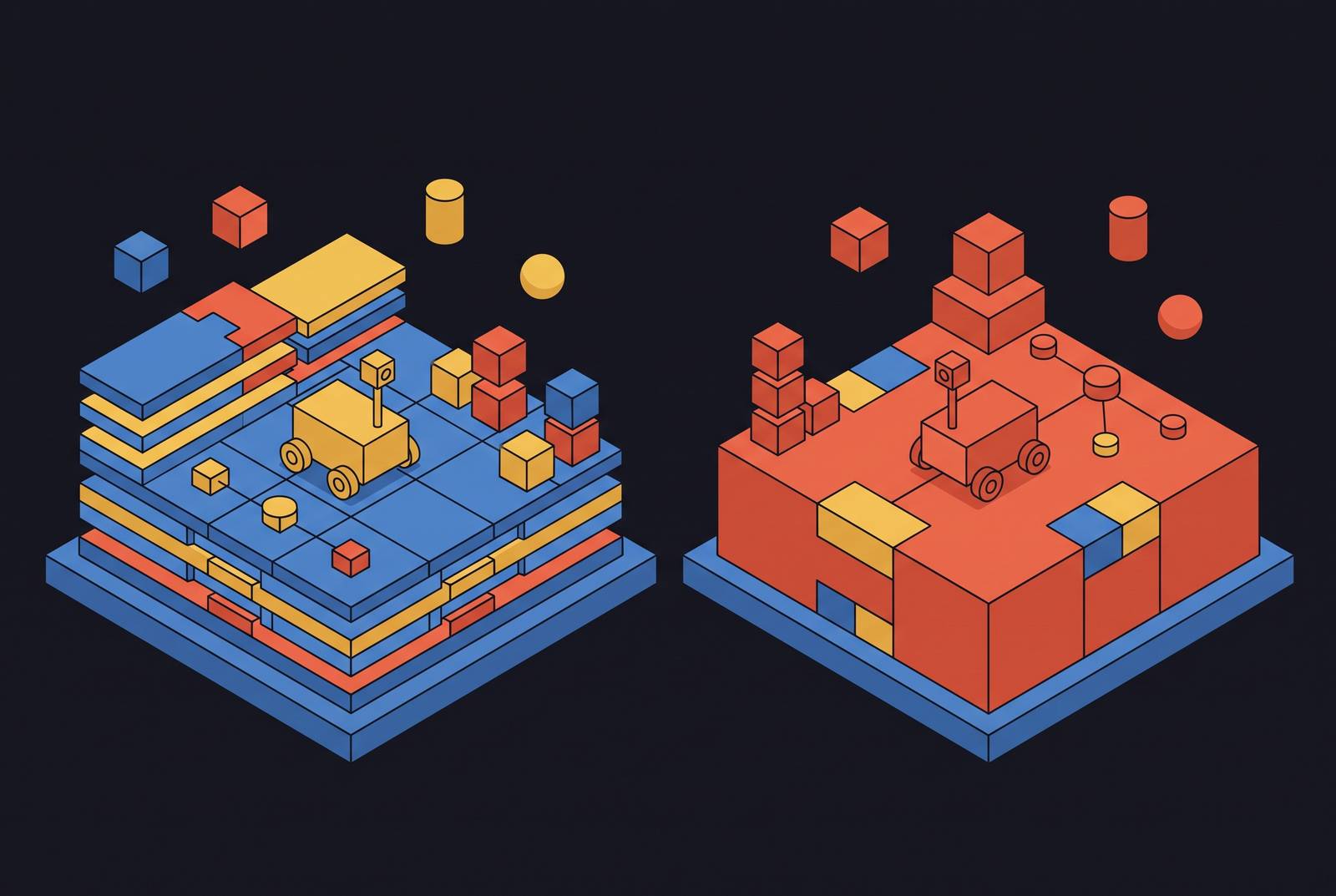
Two robots. Same name, mostly. Anyone searching "ROS 2 Gazebo tutorial" today lands on documentation split across two products that share ninety percent of their branding and none of their codebase, and figuring out which one applies to a given project takes longer than it should.
The confusing naming history of "Gazebo Ignition" and "Gazebo Classic"
Gazebo goes back to 2002, and for fifteen years it ran as one continuous project, versioned the ordinary way: Gazebo 9, then Gazebo 11. Then, in 2017, the project split into two active tracks that ran side by side for years. One track kept the old numbered releases and the same monolithic design, and that's what everyone now calls Gazebo Classic. The other, built from the ground up as a set of smaller, loosely coupled libraries, went by the name Ignition.
Ignition wasn't a codename or a beta label. It shipped, it had its own release cadence, and it was used under that name until the rebrand. Then, in 2022, Open Robotics ran into a trademark conflict and had to drop the Ignition brand. Rather than just pick a new name and move on, the team used the moment to rename both forks at once: the new architecture became simply "Gazebo," and the old monolith got relabeled "Gazebo Classic" to keep it distinguishable. Tidy in theory. In practice, it means every piece of documentation, forum post, and tutorial written before 2022 refers to "Gazebo" when it means Classic, while everything after refers to "Gazebo" and means the opposite thing. There's no shortcut around this. Anyone reading older material has to mentally substitute the word before trusting a single instruction in it.
Gazebo Classic's end-of-life and its impact on active projects
Gazebo Classic is dead, and the date is specific: end-of-life hit in January 2025, with the final release, version 11.15.1, shipped December 3, 2024. That's not a soft sunset where a maintainer quietly stops responding. gazebo_ros_pkgs was deprecated on the same timeline, with no further active maintenance. gazebo_ros2_control is in the same boat: no further updates, and the guidance for anyone still depending on it is to migrate, not to wait.
The platform gap makes this less of a choice than it sounds. Gazebo Classic was never released for Ubuntu Noble, and ROS 2 Jazzy doesn't support it. So a developer starting a new project on Jazzy or later isn't weighing tradeoffs between Classic and modern Gazebo. There's no supported Classic path to weigh. The decision's already made by the platform underneath it.
How modern Gazebo's architecture differs from the Classic monolith
Gazebo Classic was one binary doing everything: ODE handled physics, OpenGL handled rendering, sensor models and actuator control were tightly coupled within the same binary, and if a project wanted a different physics engine (Bullet, Simbody, DART were the options), that engine got statically compiled into the build. Swapping components meant rebuilding the application.
Modern Gazebo throws that model out. It's a collection of separate libraries, and the simulation server runs on an Entity-Component System, ECS for short, an architectural pattern that separates entities, their traits, and the logic that operates on them. Under ECS, an entity is any object in the scene, a model, a link, a light source, an actor. A component is a trait attached to that entity: its pose, its name, its geometry. Systems are the code that reads and writes components across entities each simulation step. It's a cleaner separation of what a thing is from what happens to it.
The payoff is most visible in how physics and rendering get loaded. Both are plugins in modern Gazebo, not compiled-in dependencies, so a new physics engine can be integrated as a plugin rather than compiled into Gazebo's core. Classic never offered that. Swapping an engine there meant a source-level change and a rebuild; in modern Gazebo it's a matter of loading a different plugin at runtime.
Plugin compatibility between Classic and its rewrite requirements
Classic supports six C++ plugin types, each opening a specific slice of the API. Every plugin a project built against Classic was written against those six interfaces and against Classic's monolithic internals directly.
Modern Gazebo's plugin interfaces are structured differently from that list, and in most cases they cover more ground. They're structured differently, and in most cases they cover more ground. Two categories have no Classic equivalent at all: plugins for integrating a custom physics engine and plugins for integrating a custom rendering engine. Both of those can be used entirely outside of Gazebo, in other software that needs a physics or rendering backend, which says something about how much more general the modern architecture is compared to something purpose-built for one simulator.
None of this transfers automatically. A Classic plugin cannot be dropped into a modern Gazebo project and expected to compile, let alone run. It has to be rewritten against the ECS-based API, and how much rewriting that takes depends on how deep the original plugin reached into Classic's internals. A plugin that just reads joint states and publishes them is a modest port. A plugin that hooked into Classic's physics loop directly is closer to a rewrite from scratch.
ROS 2 integration: ros_gz's replacement of gazebo_ros_pkgs and remaining friction
Under Classic, gazebo_ros_pkgs did the bridging work directly: it sat between Gazebo's own C++ API and transport system and translated that into ROS 2 topics and services. One package, one job.
Modern Gazebo splits that job across ros_gz. The two sub-packages that matter most are ros_gz_bridge, which handles topic translation between Gazebo Transport and ROS 2, and ros_gz_sim, which handles integration for running Gazebo Sim alongside ROS 2. Anyone who has bridged ROS 1 and ROS 2 topics during that earlier migration will recognize the pattern immediately; it's the same idea of a translation layer sitting between two message systems that don't speak natively to each other.
Services are the sore spot. ros_gz doesn't expose modern Gazebo's services to ROS 2 automatically. ros_gz_interfaces gives you the message and service definitions, but the underlying services stay in Gazebo Transport unless someone explicitly wires them through ros_gz_bridge, and that configuration step is, by the project's own acknowledgment, complicated and thin on documentation. Anyone building a service-heavy architecture (rather than a pure topic-based one) should budget real time here, not assume it works the way topic bridging does.
ROS 2 distro pairings and support windows that should govern version selection
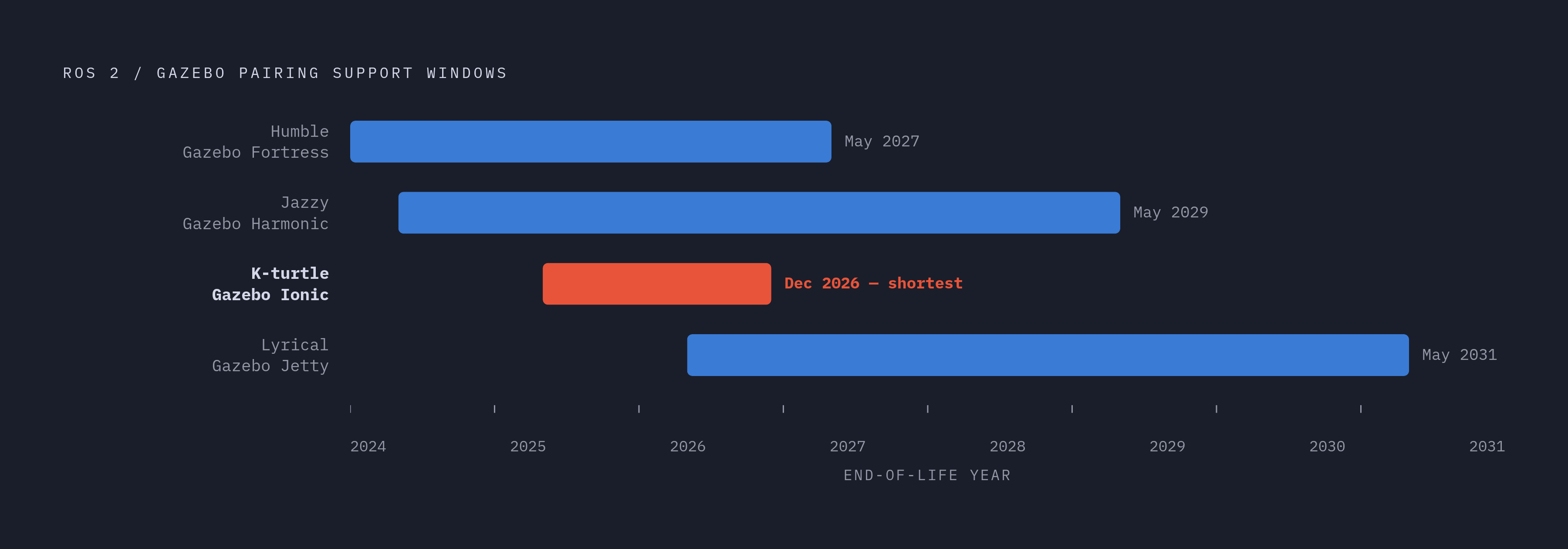
The pairing isn't a matter of taste. ROS 2 Jazzy pairs officially with Gazebo Harmonic, distributed through packages.ros.org, and Harmonic's support runs to May 2029. K-turtle pairs with Gazebo Ionic, which reaches end-of-life in December 2026, a notably shorter runway than the others. Lyrical pairs with Gazebo Jetty, supported through May 2031.
Humble sits in its own category. Its official pairing is with Gazebo Fortress, but Harmonic can technically run alongside Humble using non-ROS binaries from packages.osrfoundation.org. That path comes with a real catch: those binaries conflict with the ros-humble-ros-gz* packages, so mixing them isn't a clean drop-in and needs to be handled deliberately rather than assumed to work.
Combine that with the platform constraint from earlier, no Classic on Jazzy, no Classic on Ubuntu Noble at all, and the pairing table basically makes the decision for new projects before a developer even opens an issue tracker. Legacy Humble projects still running Classic have a window, but Fortress's end-of-life sets a hard boundary on how long that window stays open.
The concrete migration steps requiring the most work from projects
Migrating an existing project off Classic isn't one step, it's six, and they're mechanical enough to list: swap gazebo and gazebo_ros_pkgs dependencies in package.xml and CMakeLists.txt for their ros_gz equivalents, edit every launch file that starts Gazebo, update world files to current SDFormat conventions, edit the launch files that spawn models, edit the model SDFormat files themselves, and configure topic bridging between ROS 2 and modern Gazebo.
Effort isn't spread evenly across those six. Custom plugin rewrites cost the most, for the reasons already covered, since the depth of the rewrite tracks how tightly a plugin was bound to Classic's internals. Bridge configuration for service-heavy designs costs a moderate amount, made worse by how underdocumented that corner still is. World and model file conversion sits at the bottom of the effort scale individually, but it's not free: updating world and model files to the current SDFormat conventions touches every single world file in a project, and that adds up fast on anything with more than a handful of environments.
None of this applies to a project starting fresh. New builds go straight onto ros_gz without ever touching gazebo_ros_pkgs, so the migration list above is purely a Classic-to-modern concern.
A decision framework by project type and constraint
For a new project on ROS 2 Jazzy or later, there's nothing to weigh: Classic has no supported path on that platform, so modern Gazebo paired with Harmonic is the only option on the table.
For a project already running Humble with Gazebo Classic, the system still works today, but the window is bounded. Fortress's end-of-life in May 2027 sets the outer edge of that runway, and migration planning should start well before that date arrives, not after.
Projects with heavy investment in custom Classic plugins face a real cost. The sensible approach is plugin-by-plugin evaluation against the ECS API, prioritizing the ones that touch physics or rendering first, since those are exactly the plugins that gain the most from modern Gazebo's plugin-based engine architecture.
And for anything that needs large-scale or distributed simulation, the choice isn't close. Modern Gazebo's support for simulation levels, distributed computing, and cloud integration gives it capability Classic's monolithic design was never built to offer. Classic can't be extended into that territory; it has to be replaced.